> ## Documentation Index
> Fetch the complete documentation index at: https://docs.blockscout.com/llms.txt
> Use this file to discover all available pages before exploring further.
# Hardhat Verification Plugin
[Hardhat](https://hardhat.org/) is a full-featured development environment for contract compilation, deployment and verification. The [hardhat-verify plugin](https://hardhat.org/hardhat-runner/plugins/nomicfoundation-hardhat-verify) supports contract verification on Blockscout.
This guide uses the **per-instance API** (no key required) rather than the Pro API. The Pro API path is in development and Blockscout's native verification API (a separate, REST-based endpoint) isn't compatible with hardhat-verify's request format. Per-instance is the current working path. This is Hardhat 2 syntax — install with `@nomicfoundation/hardhat-verify@hh2`, since a plain install now defaults to Hardhat 3.
## Get Started
### **1) Install Hardhat**
If you are starting from scratch, create an npm project by going to an empty folder, running `npm init`, and following the instructions. Recommend npm 7 or higher.
Once your project is ready:
**npm instructions**
```sh theme={null}
npm install --save-dev hardhat
```
**yarn instructions**
```sh theme={null}
yarn add --dev hardhat
```
### **2) Create a project**
Run `npx hardhat` in your project folder and follow the instructions to create ([more info here](https://hardhat.org/getting-started/#quick-start)).
### 3) Install plugin
Install the [hardhat-verify plugin](https://hardhat.org/hardhat-runner/plugins/nomicfoundation-hardhat-verify)
**npm**
```sh theme={null}
npm install --save-dev @nomicfoundation/hardhat-verify@hh2
```
**yarn**
```sh theme={null}
yarn add --dev @nomicfoundation/hardhat-verify@hh2
```
Note the `@hh2` tag above — plain `npm install @nomicfoundation/hardhat-verify` now installs v3 (Hardhat 3), which uses a different config format entirely.
### 4) Add plugin reference to config file
Add the following statement to your `hardhat.config.js`.
```javascript theme={null}
require("@nomicfoundation/hardhat-verify");
```
If using TypeScript, add this to your `hardhat.config.ts.` [More info on using typescript with hardhat available here](https://hardhat.org/guides/typescript.html#typescript-support).
```ts theme={null}
import "@nomicfoundation/hardhat-verify";
```
## Config File and Unsupported Networks
Your basic [Hardhat config file](https://hardhat.org/config/) (`hardhat.config.js` or `hardhat.config.ts`) will be setup to support the network you are working on. In this example we use the Optimism Sepolia test network and a `.ts` file.
Here we add an RPC url without an API key, however some value is still required. You can use any arbitrary string. [More info](https://hardhat.org/hardhat-runner/plugins/nomicfoundation-hardhat-verify#multiple-api-keys-and-alternative-block-explorers).
In order to use Blockscout explorer for the verification, you have to specify the explorer details under a `customChains` object. It includes:
* `chainId` - Network chain ID
* `apiURL` - Block explorer API URL
* `browserURL` - Block explorer URL
Find an extensive list of ChainIDs at [https://chainlist.org/](https://chainlist.org/).
Note the network name in `customChains` must match the network name in the `apiKey` object.
```ts theme={null}
import { HardhatUserConfig, vars } from "hardhat/config";
import "@nomicfoundation/hardhat-toolbox";
import "@nomicfoundation/hardhat-verify";
const PRIVATE_KEY = vars.get("PRIVATE_KEY");
const config: HardhatUserConfig = {
solidity: "0.8.24",
networks: {
'optimism-sepolia': {
url: 'https://sepolia.optimism.io',
accounts: [PRIVATE_KEY],
},
},
etherscan: {
apiKey: {
// Is not required by blockscout. Can be any non-empty string
'optimism-sepolia': "abc"
},
customChains: [
{
network: "optimism-sepolia",
chainId: 11155420,
urls: {
apiURL: "https://optimism-sepolia.blockscout.com/api",
browserURL: "https://optimism-sepolia.blockscout.com/",
}
}
]
},
sourcify: {
enabled: false
}
};
export default config;
```
### Verifying on multiple chains?
If you deploy to more than one network, you don't need a separate config block per chain. Define your chains once in an array and generate `networks`, `etherscan.apiKey`, and `customChains` from it:
```ts theme={null}
import { HardhatUserConfig, vars } from "hardhat/config";
import "@nomicfoundation/hardhat-toolbox";
import "@nomicfoundation/hardhat-verify";
const PRIVATE_KEY = vars.get("PRIVATE_KEY");
// Single source of truth for every chain you deploy to.
// Add a new chain by adding one line here — no need to touch
// `networks` or `customChains` separately.
const CHAINS = [
{ network: "optimism-sepolia", chainId: 11155420, rpc: "https://sepolia.optimism.io", explorer: "optimism-sepolia" },
{ network: "base-sepolia", chainId: 84532, rpc: "https://sepolia.base.org", explorer: "base-sepolia" },
{ network: "optimism", chainId: 10, rpc: "https://mainnet.optimism.io", explorer: "optimism" },
{ network: "base", chainId: 8453, rpc: "https://mainnet.base.org", explorer: "base" },
{ network: "arbitrum-one", chainId: 42161, rpc: "https://arb1.arbitrum.io/rpc", explorer: "arbitrum" },
];
const config: HardhatUserConfig = {
solidity: "0.8.24",
networks: Object.fromEntries(
CHAINS.map(({ network, chainId, rpc }) => [
network,
{ url: rpc, accounts: [PRIVATE_KEY], chainId },
])
),
etherscan: {
// Not required by Blockscout, but the plugin needs *some* non-empty
// string per network — the network name in this object must match
// the network name used in `customChains` below.
apiKey: Object.fromEntries(
CHAINS.map(({ network }) => [network, "abc"])
),
customChains: CHAINS.map(({ network, chainId, explorer }) => ({
network,
chainId,
urls: {
apiURL: `https://${explorer}.blockscout.com/api`,
browserURL: `https://${explorer}.blockscout.com/`,
},
})),
},
sourcify: {
enabled: false,
},
};
export default config;
```
Run `npx hardhat verify --list-networks` at any time to confirm which network identifiers are registered in your config.
## Deploy and Verify
For deployment we will use [Hardhat Ignition](https://hardhat.org/ignition/docs/getting-started#overview) - built-in Hardhat deployment system.
### Deploy
```txt theme={null}
> npx hardhat ignition deploy ./ignition/modules/Lock.ts --network optimism-sepolia
✔ Confirm deploy to network optimism-sepolia (11155420)? … yes
Compiled 1 Solidity file successfully (evm target: paris).
Hardhat Ignition 🚀
Deploying [ LockModule ]
Batch #1
Executed LockModule#Lock
[ LockModule ] successfully deployed 🚀
Deployed Addresses
LockModule#Lock - 0xFE826b33e425f99ce962ACB91752DB41F302EFEA
```
### Verify
The plugin requires you to include constructor arguments with the verify task and ensures that they correspond to expected ABI signature. However, Blockscout ignores those arguments, so you may specify any values that correspond to the ABI.
```sh theme={null}
npx hardhat verify --network DEPLOYED_CONTRACT_ADDRESS "Constructor argument 1"
```
Optimism Sepolia example.
```sh theme={null}
> npx hardhat verify --network optimism-sepolia 0xFE826b33e425f99ce962ACB91752DB41F302EFEA 1234
Successfully submitted source code for contract
contracts/Lock.sol:Lock at 0xFE826b33e425f99ce962ACB91752DB41F302EFEA
for verification on the block explorer. Waiting for verification result...
Successfully verified contract Lock on the block explorer.
https://optimism-sepolia.blockscout.com/address/0xFE826b33e425f99ce962ACB91752DB41F302EFEA#code
```
If you're using the multi-chain config, the same command works unchanged for any chain in your `CHAINS` array — just swap `--network optimism-sepolia` for `--network base`, `--network arbitrum-one`, etc.
### Automatically verified contracts
Sometimes the contract may be automatically verified via [Ethereum Bytecode Database](https://docs.blockscout.com/about/features/ethereum-bytecode-database-microservice#solution-ethereum-bytecode-database-blockscout-ebd) service. In that case you may see the following response:
```txt theme={null}
The contract 0xFE826b33e425f99ce962ACB91752DB41F302EFEA has already been verified on Etherscan.
https://optimism-sepolia.blockscout.com/address/0xFE826b33e425f99ce962ACB91752DB41F302EFEA#code
```
In that case, you may try to enforce using `--force` flag\*.
It prevents Hardhat from checking if the contract is already verified, and force it to send verification request anyway. Notice, that it is helpful only if the contract was automatically verified **partially**. That way, a new verification sources would be saved. If the contract was **fully** verified already, that just returns an error.
```sh theme={null}
npx hardhat verify --network DEPLOYED_CONTRACT_ADDRESS "Constructor argument 1" --force
```
* The flag is available starting from `@nomicfoundation/hardhat-verify@2.0.7`
## Confirm Verification on BlockScout
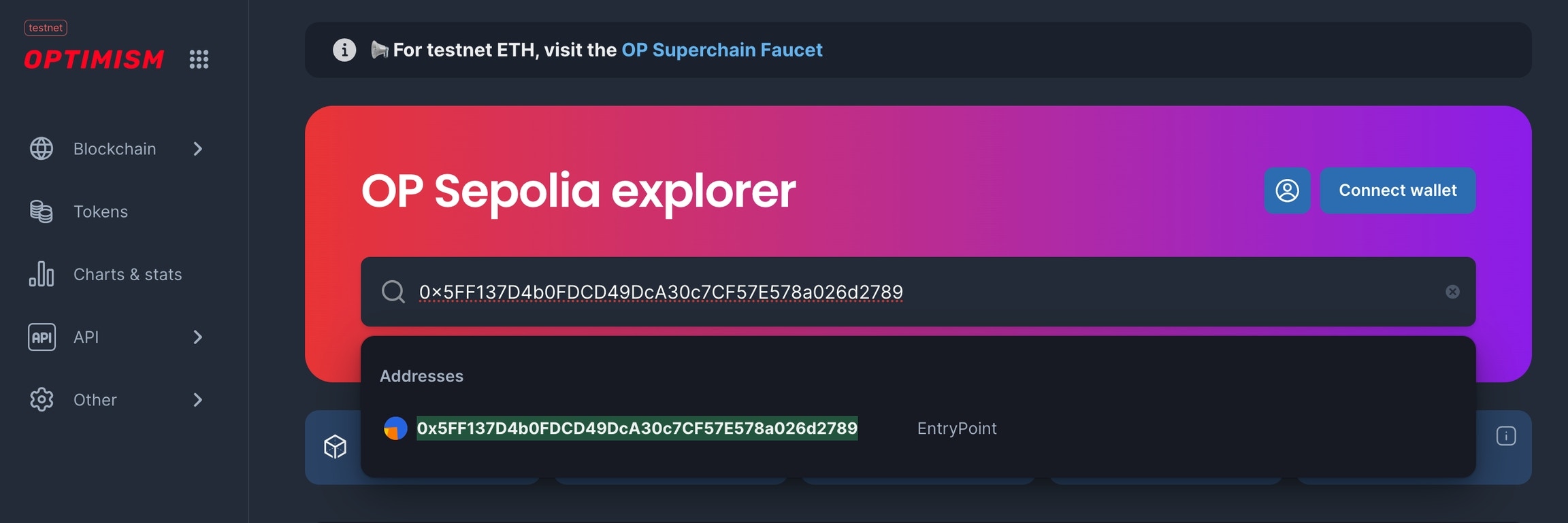
Go to your BlockScout instance and paste the contract address into the search bar.
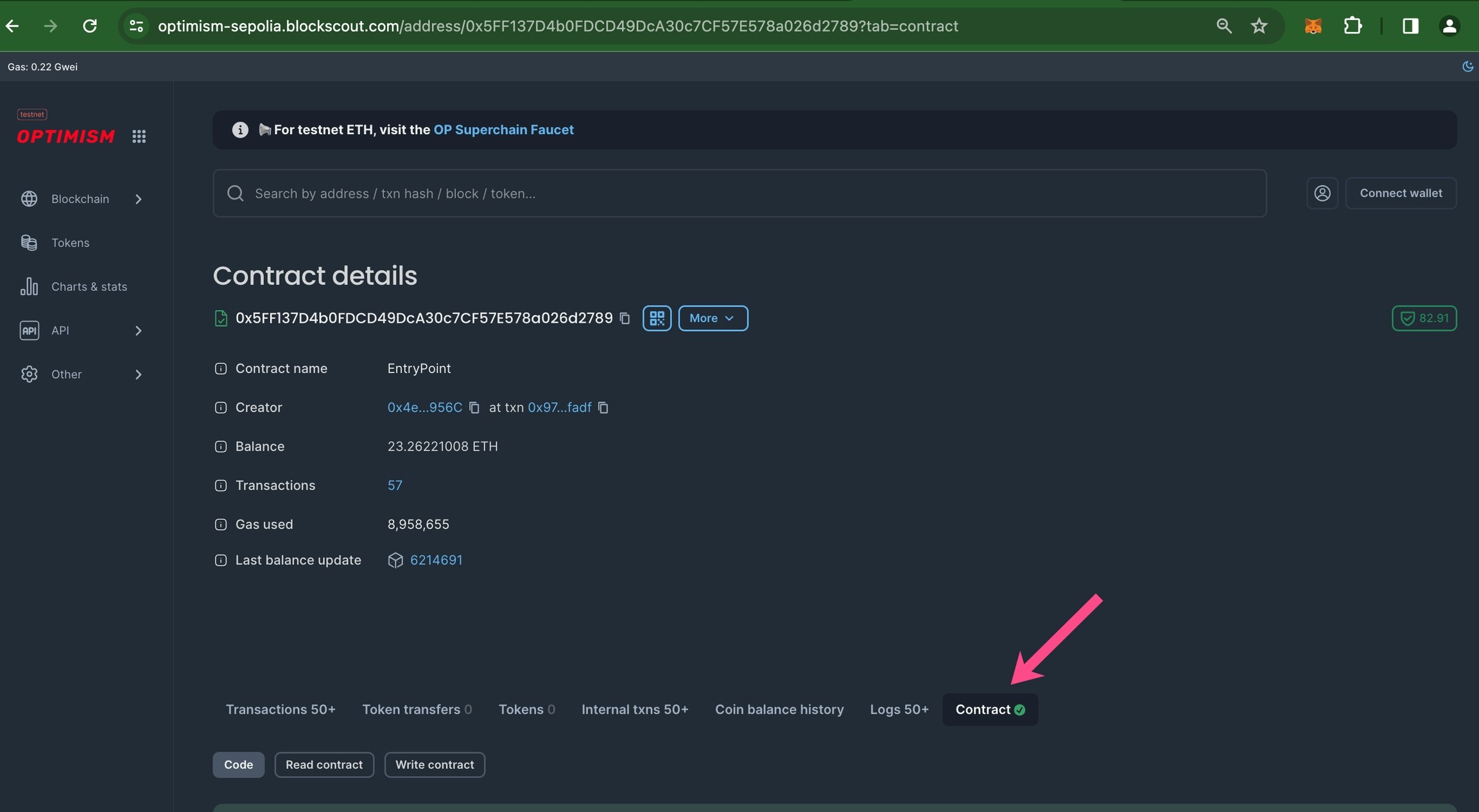
Scroll down to see verified status. A green checkmark ✅ means the contract is verified.
If your screen size is limited, you may need to click the 3 dots to view and click through to the contract.
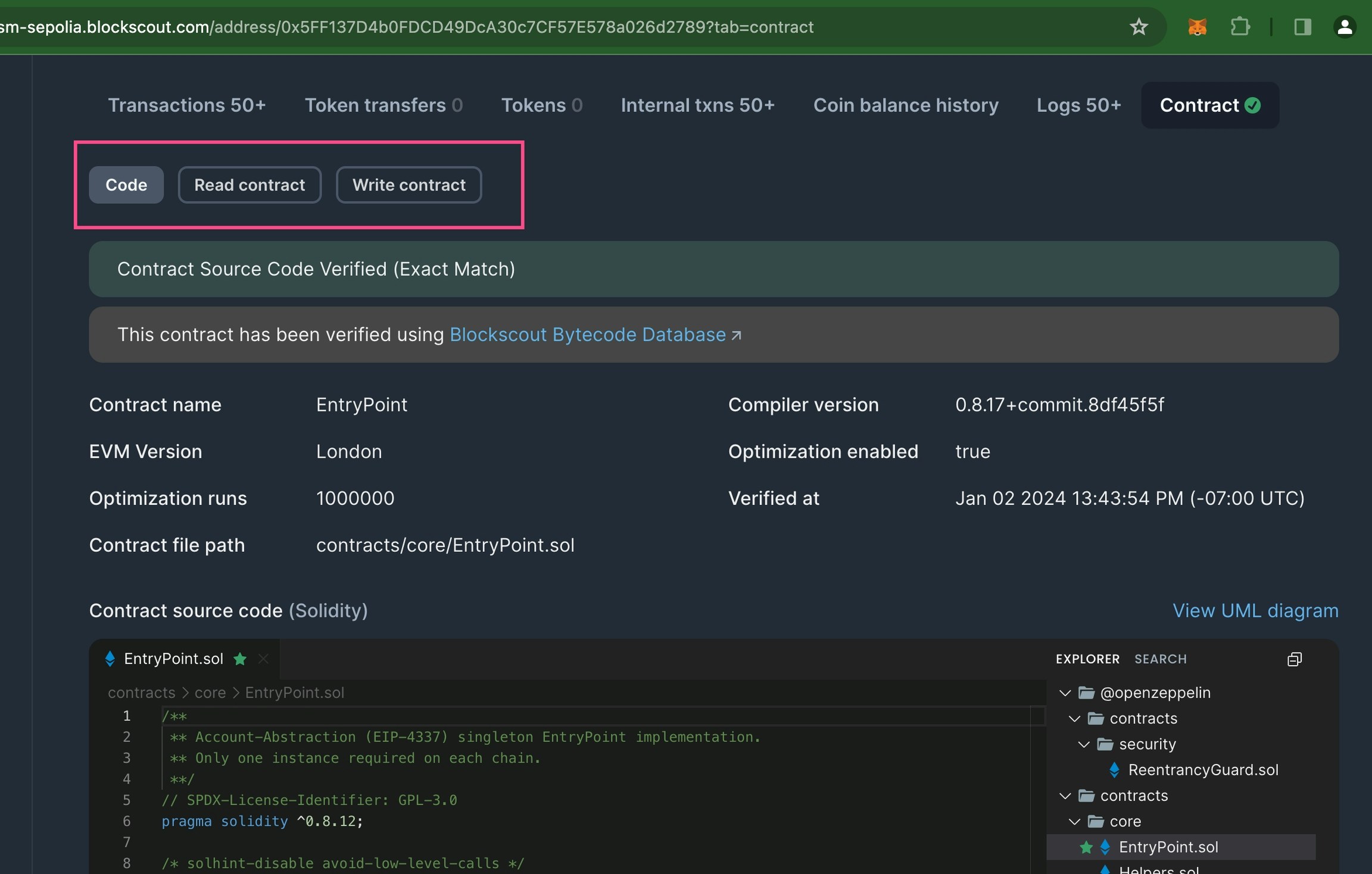
Scroll down to see and interact with the contract code.
## Video example
Community video created by Carlos Rodriguez for the Soneium Minato testnet, but can be applicable to any chain.
## FAQ
Although you receive an error, the contracts should be verified during the previous steps and you can ignore. Check in the explorer to make sure the contracts have been verified.
No. Blockscout doesn't require a valid API key for verification through this per-instance route — any non-empty string works. Each network still needs its own entry in the `apiKey` object, since the network name in `customChains` must match a key in `apiKey`.
Blockscout's separate native verification API (REST endpoints under `/api/v2/smart-contracts/{address}/verification/via/...`) is structurally incompatible with hardhat-verify, which only knows how to build Etherscan-shaped requests — so it can't be dropped into this plugin without a custom script. Per-instance is the confirmed working path until one of those is sorted out with Nomic Foundation.
## Resources
Learn more about plugin configs, troubleshooting etc. at [https://hardhat.org/hardhat-runner/plugins/nomicfoundation-hardhat-verify](https://hardhat.org/hardhat-runner/plugins/nomicfoundation-hardhat-verify)
 Scroll down to see verified status. A green checkmark ✅ means the contract is verified.
 If your screen size is limited, you may need to click the 3 dots to view and click through to the contract.
 Scroll down to see and interact with the contract code.
 ## Video example
Community video created by Carlos Rodriguez for the Soneium Minato testnet, but can be applicable to any chain.
## FAQ
## Video example
Community video created by Carlos Rodriguez for the Soneium Minato testnet, but can be applicable to any chain.
## FAQ